
Blog Date: September 30, 2024
While working with a customer recently, they were having a problem testing the SDDC managers connectivity to the online VCF_DEPOT and the VXRAIL_DEPOT. This particular customer was using VCF on VXRAIL.
After doing some searching, I came across our knowledge base article entitled: Troubleshooting VCF Depot Connection Issues
SSH into the SDDC manager as VCF, and then su to root. To test connectivity to the VMware Cloud Foundation Depot, run following curl command:
curl -kv https://depot.vmware.com:443/PROD2/evo/vmw/index.v3 -u customer_connect_usernameIf you have a VCF deployment running on VXRAIL, there’s an additional Dell Depot that will contain the rail update packages. To test connectivity to both VXRAIL and VCF Depots, run the following command:
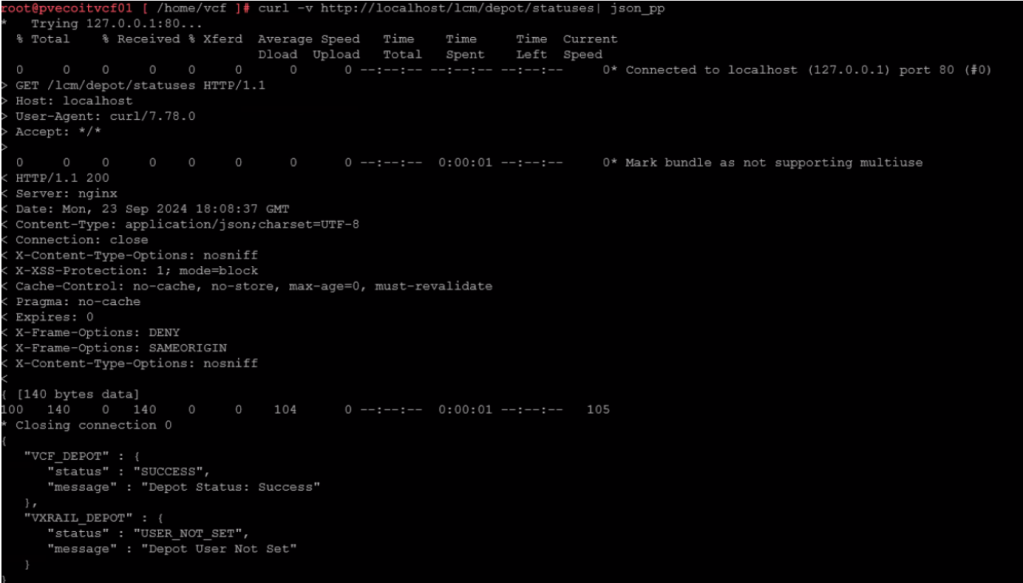
curl -v http://localhost/lcm/depot/statuses| json_pp
The Depots can return a couple of status from the curl command:
“Status” : “SUCCESS” (everything is working as expected)
“Status” : “NOT_INITIALIZED” (This could indicate a connection problem with the depot)
“Status” : “USER_NOT_SET” (the depot user has not been specified)
For my customer, the VCF_DEPOT had a “SUCCESS” status, but the VXRAIL_DEPOT had a status of “USER_NOT_SET”.
Basic pings to test:
ping depot.vmware.comping download.emc.comBasic curl commands to test:
curl -v https://depot.vmware.comcurl -v https://download.emc.comBroadcom also offers a public list of URLs that the SDDC manager uses. That list can be found here: Public URL list for SDDC Manager
 CaptainvOPS
You must be logged in to post a comment.